
Your applications aren’t operating in isolation. Perhaps you’re building a Kafka integration, syncing data to the cloud, feeding changes into ERP/CRM solutions, or wanting to build a data lake. The challenge is syncing data without repeatedly scanning tables or modifying the original application.
Regardless of your specific use case and regardless of which FairCom product you license, we have you covered with two easy-to-use Change Data Capture (CDC) solutions.
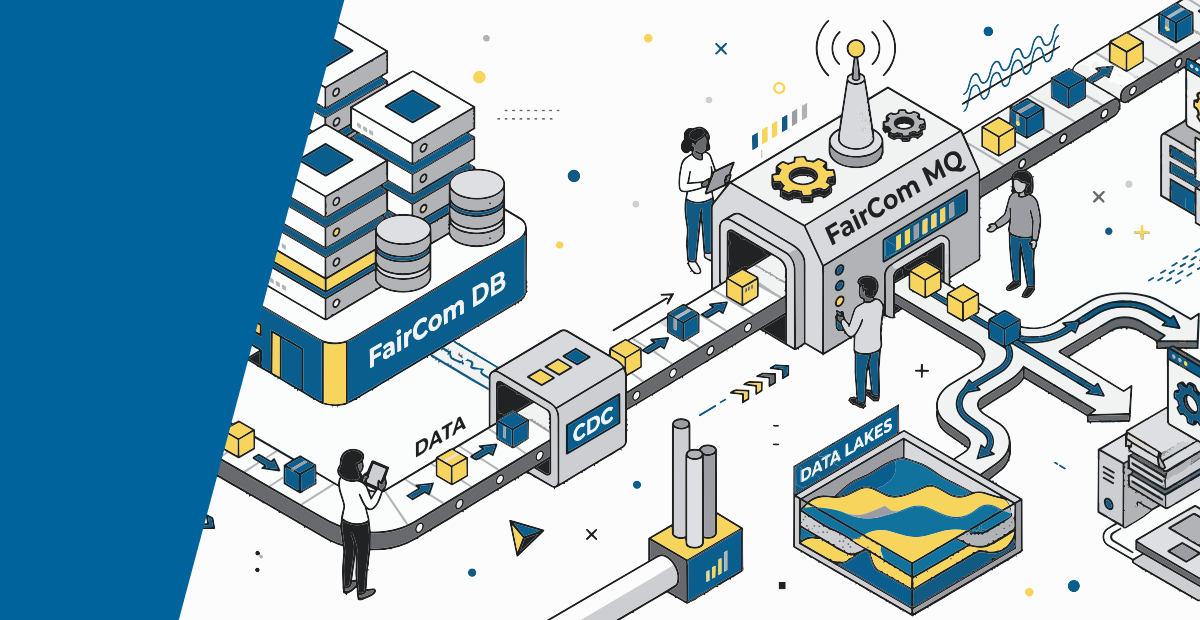
The first is DB Notify, which is available with FairCom DB v13 and later or FairCom RTG and FairCom ISAM v5 and later. DB Notify is a push-based solution loaded directly on the primary database server within applications built with FairCom DB, FairCom RTG, and FairCom ISAM. It tracks data change events and publishes them as JSON messages to FairCom’s MQTT broker, FairCom MQ.
DB Notify is optimized for distributing messages across various systems. It can communicate hundreds of data change events per second to multiple subscribers, reliably propagating notifications to subscribers in the cloud, on the edge of the network, and on personal devices.
With the v26.10 releases of FairCom’s product suite, we’ve added an additional CDC solution. This new, enhanced version—called Data Change Stream (DCS)—also works across our entire product line.
Unlike DB Notify, DCS is pull-based. It’s a high-performance CDC mechanism that runs as an isolated process within the FairCom MQ Broker. Based on FairCom’s high-speed replication layer, DCS has a higher transfer rate than DB Notify. This means DCS can keep up with higher-performing FairCom DB, FairCom RTG, and FairCom ISAM installations. It also features a data priming capability, allowing you to send existing records to FairCom MQ without touching every individual record. Note DCS will only work on FairCom data files that are under full transaction processing. DB Notify does not have this requirement.
Here’s what you can accomplish with FairCom CDC solutions
Whether you’re using DB Notify or DCS, you’re getting a flexible foundation for building data synchronization and event-driven architectures around existing FairCom applications. At their core, these solutions work by turning database activity into a stream of discrete change events.
Both track live data changes at the low-level database engine layer, convert changes into pure JSON messages, and persist them in FairCom’s MQTT broker. They’re simple to configure, with no extensive coding. In fact, both solutions have been successfully deployed by customers in under 30 minutes.
If you need to build a microservices layer, perform streaming analytics using platforms like Kafka, or simply identify what has changed within an existing FairCom database application, these solutions make building out this infrastructure fast and seamless.
From database changes to usable data streams
At their core, FairCom’s CDC solutions turn database activity into a stream of discrete change events.
When a record is inserted, updated, or deleted, the change is captured and delivered to FairCom MQ. Each event is represented in a JSON document, which can contain the source database and table, the operation performed, or other information as configured.
For example, an update can show the previous field value alongside the new value:
{
  "operation": "update",
  "transactionTimestamp": "2026-09-26T12:37:25.490Z",
  "serverName": "FAIRCOMS",
  "sourceDatabaseName": "ctreeSQL",
  "sourceOwnerName": "admin",
  "sourceTableName": "custmast",
  "fields": [
    {
      "fieldName": "cm_custcity",
      "beforeValue": "Salt Lake City",
      "afterValue": "Columbia",
      "pk": 1,
      "changed": true
    }
  ]
}
Your downstream applications get more than a notification that something has changed—they get a specific record of what changed and in what way.
How FairCom Change Data Capture solutions differ
Capability
DCS
DB Notify
Captures inserts, updates, and deletes
DCS
Yes
DB Notify
Yes
Produces JSON change events
DCS
Yes
DB Notify
Yes
Persists events in FairCom MQ
DCS
Yes
DB Notify
Yes
MQTT real-time consumption
DCS
Yes
DB Notify
Yes
Bulk access through SQL/JSON APIs
DCS
Yes
DB Notify
Yes, once messages are stored in FairCom MQ
CDC engine location
DCS
FairCom MQ
DB Notify
FairCom DB/RTG/ISAM
Data movement model
DCS
Pull (Replication from another FairCom product to FairCom MQ)
DB Notify
Push (from FairCom DB/RTG/ISAM to FairCom MQ)
Data priming (captures existing records)
DCS
Yes, though not required
DB Notify
Yes, by writing a simple program touching records of interest at a table-by-table level
Ideal use case
DCS
High-speed event streaming within enterprise networks; centralized CDC management, data lakes, ERP/CRM integration, etc.
DB Notify
Event-streaming within enterprise networks where small latencies aren’t disruptive
Getting started with CDC solutions in 30 minutes or less
For developers and architects, one of the key features of our CDC solutions is ease of implementation and scaling. Regardless which solution you choose, both options are trivial to set up. There are tutorials for each solution that should have you up and running within 30 minutes.
Tutorial: Setting up DB Notify
For DB Notify, you can choose to configure with or without TLS.
Without TLS, we have four steps:
- Edit the
<faircom>\config\services.jsonconfiguration file - Edit the
<faircom>\config\dbnotifyconnections.jsonfile - Edit the
<faircom>\config\dbnotify\ctreeSQLcustmast.jsonfile - Restart the server
If you need to configure TLS client authentication, you'll also need to create and test certificates first. Regardless of your method, our DB Notify documentation breaks down the exact changes needed to set up DB Notify.
Tutorial: Setting up DCS
The DCS API provides operations for creating connections, starting streams, describing streams, and pausing or resuming streaming connections.
Basic implementation boils down to five steps:
- Create a streaming connection to a FairCom server
- Define the source table and stream properties
- Choose whether to include existing records
- Apply record and field filtering
- Start the stream
Our documentation offers a more in-depth DCS tutorial.
Because the resulting events are JSON, downstream systems don’t need to understand FairCom’s underlying storage structures to consume data.
In addition, DCS works underneath the application layer. This means you can expose data while also preserving the application’s code, connecting modern data infrastructure to your established environment.
Explore FairCom Data Change Stream and DCS
To explore the API, configuration options, filtering, and deployment architecture, see FairCom Data Change Stream documentation. You can also schedule a demo of DCS here or—if you’re a current customer—through your FairCom account manager or by contacting the FairCom Support Team (support@faircom.com). We're here to help!
Last Update:
October 22, 2026